
Simple Setup
This guide covers setting up the ELLIO Traefik Middleware Plugin on a standalone Traefik deployment - the most common setup where Traefik runs as the primary reverse proxy.
Prerequisites
Section titled “Prerequisites”- Docker and Docker Compose (recommended) or standalone Traefik installation
- Bootstrap token from your custom EDL configured for “Traefik Middleware”
Step 1: Configure Traefik
Section titled “Step 1: Configure Traefik”Configure Traefik to load the ELLIO plugin and create middleware instances.
Static configuration
Section titled “Static configuration”api: dashboard: true insecure: true # Set to false in production
entryPoints: web: address: :80 websecure: address: :443
providers: docker: endpoint: unix:///var/run/docker.sock exposedByDefault: false file: filename: /etc/traefik/dynamic.yml watch: true
# ELLIO Plugin Configurationexperimental: plugins: ellio: moduleName: github.com/ELLIO-Technology/ELLIO-Traefik-Middleware-Plugin version: v1.0.2
log: level: INFO
accessLog: {}# Traefik CLI argumentstraefik \ --api.dashboard=true \ --api.insecure=true \ --entrypoints.web.address=:80 \ --entrypoints.websecure.address=:443 \ --providers.docker=true \ --providers.docker.exposedbydefault=false \ --providers.file.filename=/etc/traefik/dynamic.yml \ --providers.file.watch=true \ --experimental.plugins.ellio.modulename=github.com/ELLIO-Technology/ELLIO-Traefik-Middleware-Plugin \ --experimental.plugins.ellio.version=v1.0.2 \ --log.level=INFO \ --accesslog=trueDynamic configuration
Section titled “Dynamic configuration”http: middlewares: # ELLIO EDL Middleware ellio-edl: plugin: ellio: bootstrapToken: "YOUR_ELLIO_BOOTSTRAP_TOKEN" logLevel: "info" ipStrategy: "direct" # Change based on your setup
routers: # Protected application protected-app: rule: "Host(`app.example.com`)" service: my-app middlewares: - ellio-edl entryPoints: - web
# Dashboard (secure in production) api: rule: "Host(`traefik.example.com`)" service: api@internal entryPoints: - web
services: my-app: loadBalancer: servers: - url: "http://192.168.1.100:8080"Step 2: Deploy with Docker Compose
Section titled “Step 2: Deploy with Docker Compose”services: traefik: image: traefik:v3.2 container_name: traefik restart: unless-stopped ports: - "80:80" - "443:443" - "8080:8080" # Dashboard - secure in production volumes: - /var/run/docker.sock:/var/run/docker.sock:ro - ./traefik.yml:/etc/traefik/traefik.yml:ro - ./dynamic.yml:/etc/traefik/dynamic.yml:ro networks: - web
# Example backend service whoami: image: traefik/whoami container_name: whoami networks: - web labels: - "traefik.enable=false" # Using file provider
networks: web: driver: bridgeservices: traefik: image: traefik:v3.2 container_name: traefik restart: unless-stopped ports: - "80:80" - "443:443" - "8080:8080" # Dashboard - secure in production volumes: - /var/run/docker.sock:/var/run/docker.sock:ro command: - --api.dashboard=true - --api.insecure=true - --providers.docker=true - --providers.docker.exposedbydefault=false - --entrypoints.web.address=:80 - --entrypoints.websecure.address=:443 - --experimental.plugins.ellio.modulename=github.com/ELLIO-Technology/ELLIO-Traefik-Middleware-Plugin - --experimental.plugins.ellio.version=v1.0.2 - --log.level=INFO - --accesslog=true networks: - web
# Example backend service with ELLIO protection whoami: image: traefik/whoami container_name: whoami restart: unless-stopped networks: - web labels: - "traefik.enable=true" - "traefik.http.routers.whoami.rule=Host(`whoami.localhost`)" - "traefik.http.routers.whoami.entrypoints=web" - "traefik.http.routers.whoami.middlewares=ellio-edl" # ELLIO EDL Middleware - "traefik.http.middlewares.ellio-edl.plugin.ellio.bootstrapToken=YOUR_ELLIO_BOOTSTRAP_TOKEN" - "traefik.http.middlewares.ellio-edl.plugin.ellio.logLevel=info" - "traefik.http.middlewares.ellio-edl.plugin.ellio.ipStrategy=direct"
networks: web: driver: bridgeStart your services
Section titled “Start your services”# Start servicesdocker-compose up -d
# View logsdocker-compose logs -f traefikStep 3: Test your setup
Section titled “Step 3: Test your setup”Verify plugin loading
Section titled “Verify plugin loading”# Check Traefik logs for ELLIO plugin initializationdocker logs traefik 2>&1 | grep -i ellio
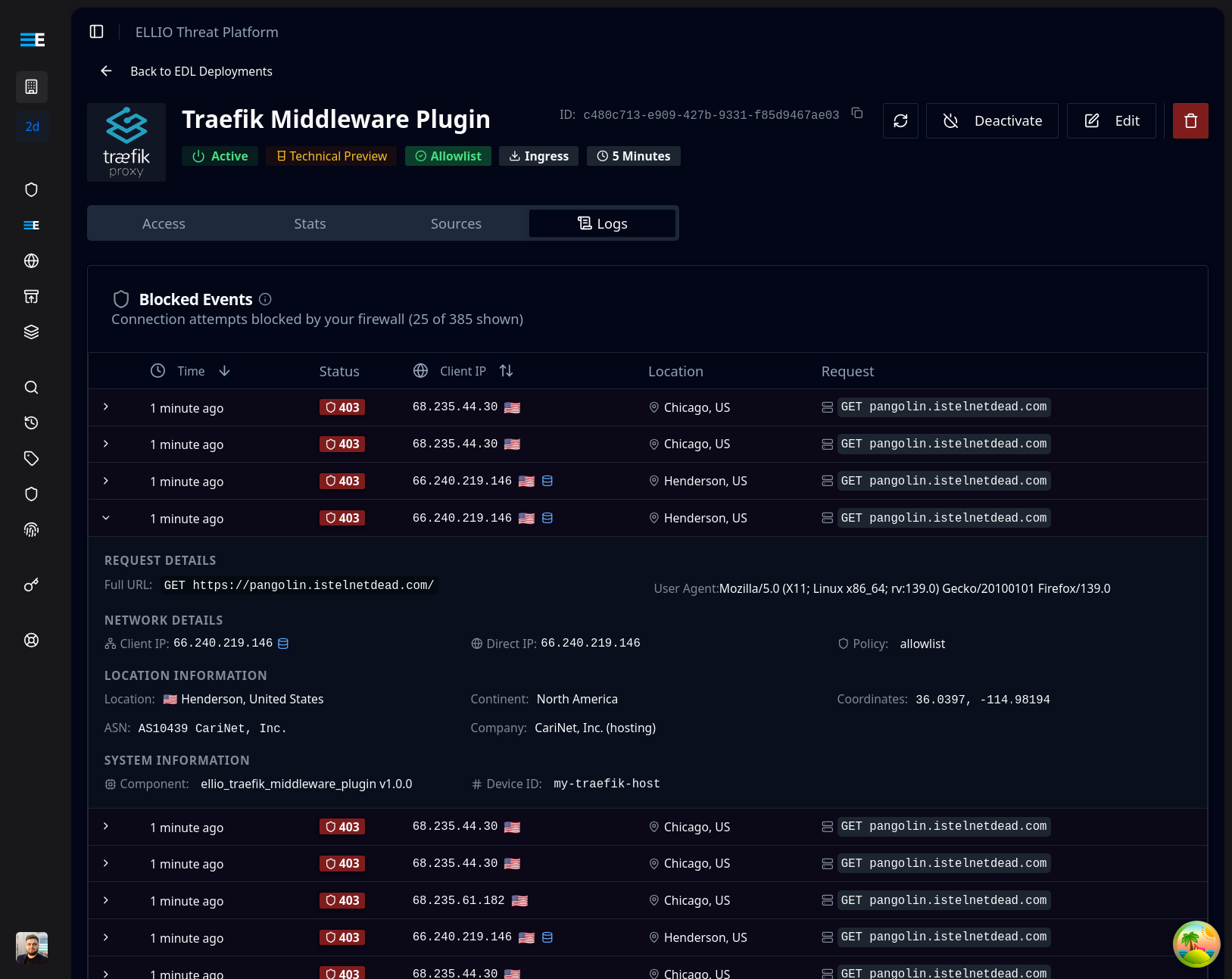
# Should show messages like:# Initializing ELLIO middleware for deployment: YOUR_DEPLOYMENT_IDOnce the plugin is active, blocked requests appear in your ELLIO platform dashboard:
Test access control
Section titled “Test access control”# 1. Add your current IP to blocklist in ELLIO platform# 2. Wait for EDL refresh (check your EDL update frequency)
# Test from blocked IP (should get 403)curl -H "Host: app.example.com" http://localhost/# Expected: 403 Forbidden
# Test from different IP or remove from blocklist# Expected: Normal response# 1. Add your current IP to allowlist in ELLIO platform# 2. Wait for EDL refresh
# Test from allowed IP (should work)curl -H "Host: app.example.com" http://localhost/# Expected: Normal response
# Test from non-allowed IP (should get 403)# Expected: 403 Forbidden# Add to /etc/hosts for local testingecho "127.0.0.1 app.example.com" >> /etc/hosts
# Test the endpointcurl http://app.example.com/
# Check Traefik dashboardcurl http://localhost:8080/dashboard/Configuration options
Section titled “Configuration options”IP strategy selection
Section titled “IP strategy selection”Choose the IP extraction strategy that matches your topology:
# Use when Traefik receives direct client connectionsmiddlewares: ellio-edl: plugin: ellio: bootstrapToken: "YOUR_ELLIO_BOOTSTRAP_TOKEN" ipStrategy: "direct"# Use when behind another reverse proxy or load balancermiddlewares: ellio-edl: plugin: ellio: bootstrapToken: "YOUR_ELLIO_BOOTSTRAP_TOKEN" ipStrategy: "xff" trustedProxies: - "10.0.0.0/8" - "172.16.0.0/12" - "192.168.0.0/16"# Use when proxy sets custom header for real IPmiddlewares: ellio-edl: plugin: ellio: bootstrapToken: "YOUR_ELLIO_BOOTSTRAP_TOKEN" ipStrategy: "custom" trustedHeader: "X-Real-IP" trustedProxies: - "your.proxy.ip/32"Next steps
Section titled “Next steps”- Cloudflare Setup - if you’re behind Cloudflare
- Pangolin Integration - if you’re running Pangolin