
Detection rules
ELLIO ships six reference YARA-L rules that correlate your network telemetry against the ELLIO entities. They are built on one principle: inbound attempts are constant internet background pressure, so severity is earned by what actually happened, not by who knocked.
| Rule | Severity | Fires when |
|---|---|---|
ellio_inbound_recon_scan |
LOW | a promiscuous (scanner) IP contacts 5+ of your hosts |
ellio_inbound_exploitation_attempt |
MEDIUM | a malicious (exploitation-class) IP contacts your assets |
ellio_inbound_exploitation_allowed |
HIGH | that contact was allowed through instead of blocked |
ellio_inbound_then_callback |
HIGH | the targeted host later connects back out to the same IP - a successful-compromise pattern |
ellio_watched_cve_exploitation |
HIGH | the inbound IP actively exploits a CVE on your watchlist |
ellio_egress_to_malicious_ip |
HIGH | an internal asset connects out to a malicious ELLIO IP - possible C2 or exfiltration |
Because the detection engine only matches events inside an indicator’s validity window, an expired indicator stops firing on its own - no rule maintenance.
What firing looks like
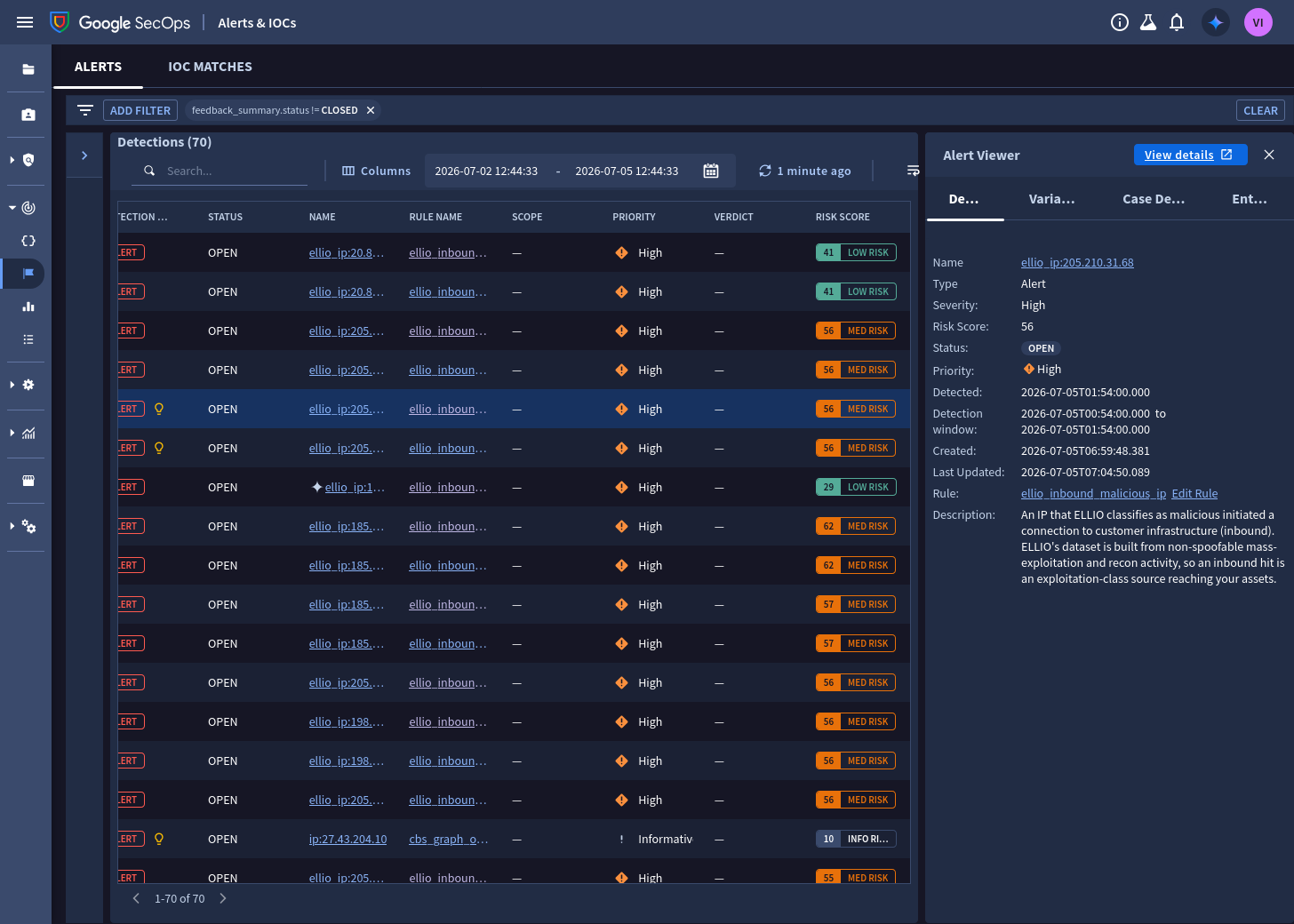
Section titled “What firing looks like”Detections land in Alerts & IOCs, one per matched ELLIO IP, with the indicator’s risk score carried onto the alert by the rule outcome and the rule description explaining what the source is:
Install
Section titled “Install”For each file in the rules directory, create a rule in Detections → Rules Editor and paste the content - or script it with the secops CLI:
for f in rules/*.yaral; do secops rule create --file "$f"; doneThen activate the rules you want and enable alerting per your process.
How a rule reads the entity
Section titled “How a rule reads the entity”ellio_inbound_exploitation_attempt joins a network event to the ELLIO entity and surfaces
the score and context on the alert:
rule ellio_inbound_exploitation_attempt {  meta:    severity = "MEDIUM"  events:    // inbound: the ELLIO-tracked IP is the source of the connection    $e.principal.ip = $ellio_ip
    $ioc.graph.entity.ip = $ellio_ip    $ioc.graph.metadata.product_name = "ELLIO: Threat Intelligence"    $ioc.graph.metadata.entity_type = "IP_ADDRESS"    $ioc.graph.metadata.threat.category_details = "classification:malicious"  match:    $ellio_ip over 1h  outcome:    $risk_score      = max($ioc.graph.metadata.threat.risk_score)    $exploit_context = array_distinct($ioc.graph.metadata.threat.category_details)    $targets_hit     = count_distinct($e.target.ip)  condition:    $e and $ioc}
The outcome variables land on the alert: the risk score for triage ordering, and
$exploit_context carries the CVEs, tags, and kill-chain labels of the attacker.
Tuning
Section titled “Tuning”- Scope to your assets. Each inbound rule has a commented
$e.target.ip in %customer_internal_rangesline - load your public ranges into that reference list and uncomment it to drop noise from non-customer destinations. - Risk threshold. Add
$risk_score >= 80to a rule’s condition to alert only on high-risk indicators. ELLIO’s risk score is recency-decayed, so this also filters for recent activity - there is no need for a separate freshness rule. - Recon fan-out.
ellio_inbound_recon_scanalerts at 5+ distinct targets; raise the threshold on noisy perimeters. security_result.actiondependency.ellio_inbound_exploitation_allowedrelies on your firewall or proxy parsers populating ALLOW/BLOCK. Verify your log sources set it before relying on the allowed/blocked split.- Callback window.
ellio_inbound_then_callbackcorrelates the inbound hit and the callback within 4 hours; widen it for slow-burn implants at the cost of more match state.
Next steps
Section titled “Next steps”- CVE watchlist - wire your exposure into the HIGH tier
- Dashboards