
Actions reference
All actions run on IP Address entities and also accept an optional comma-separated IP Addresses parameter. Only public, globally-routable unicast IPs are processed - private, reserved, multicast, and SOAR-internal addresses are skipped and reported, never silently dropped.
Enrich IP
Section titled “Enrich IP”Looks up each IP against the ELLIO CTI API, writes ELLIO_* context onto the entity, marks
malicious and promiscuous IPs suspicious, adds the threat-intelligence insight card, and
returns a recommended case priority.
Recommended priority. Returned as the script result recommended_priority: High when
any malicious IP was found, otherwise None. The action never changes the case priority - a
playbook applies the recommendation.
Fields written onto the entity (ELLIO_ prefix; a field is written only when ELLIO has
the data):
| Field | Meaning |
|---|---|
ELLIO_classification |
malicious / promiscuous / unknown / benign |
ELLIO_tags / ELLIO_tag_ids |
behavior detections (human labels and stable machine ids) |
ELLIO_cve |
CVEs the IP was observed exploiting |
ELLIO_actor |
attributed operator (research org for scanners, threat group when known) |
ELLIO_spoofable |
whether the observed traffic could be spoofed (False = confirmed direct) |
ELLIO_rdns |
reverse-DNS hostname |
ELLIO_country / ELLIO_country_name / ELLIO_continent |
source geolocation |
ELLIO_ports / ELLIO_non_spoofable_ports |
observed destination ports |
ELLIO_muonfp / ELLIO_ja3 / ELLIO_ja4 |
network fingerprints |
ELLIO_http_path / ELLIO_http_user_agent |
observed HTTP request paths and user agents |
ELLIO_first_seen / ELLIO_last_seen |
first and last observed by ELLIO |
ELLIO_direction |
the IP’s role in this alert (source / destination), from the alert’s own flows |
Long lists are capped for display (for example ports on a mass scanner), with a (+N more)
marker. An IP not tracked by ELLIO is reported as Not in ELLIO - a lookup failure, by
contrast, fails the action so a playbook can branch on it.
| Parameter | Default | Purpose |
|---|---|---|
| IP Addresses | - | additional comma-separated IPs |
| Create Insight | true | add the threat-intelligence insight card per enriched IP |
CBS Lookup
Section titled “CBS Lookup”Classifies IPs against ELLIO Common Business Services - known cloud, CDN, SaaS, ISP, security, and crawler infrastructure - and adds the provider insight card. A CBS match means the IP belongs to a known service, not that it is safe or malicious; combine with Enrich IP for the threat verdict.
Fields written (ELLIO_CBS_ prefix): cidr, providers, types, services,
regions, ids, direction.
The script result is true when any IP matched a CBS range.
| Parameter | Default | Purpose |
|---|---|---|
| IP Addresses | - | additional comma-separated IPs |
| Create Insight | true | add the Common Business Services insight card per match |
Add IP to Blocklist
Section titled “Add IP to Blocklist”Lets you push IP addresses to an ELLIO Blocklist Automation ruleset, from where they distribute to your enforcement points - typically as a playbook response action behind a human-approval step.
| Parameter | Default | Purpose |
|---|---|---|
| IP Addresses | - | additional comma-separated IPs |
| Rule Name | auto | override for the rule name; the default is parsable case context: secops_case=<id> | alert=<name> | ellio=<classification> |
| Expires In Days | 14 | rule expiry; 0 creates a permanent rule |
| Conflict Resolution | extend | extend / override / skip / fail for an existing rule on the same IP |
The JSON result reports each IP as added, failed (with the reason), or skipped
(SOAR-internal or not a public IP).
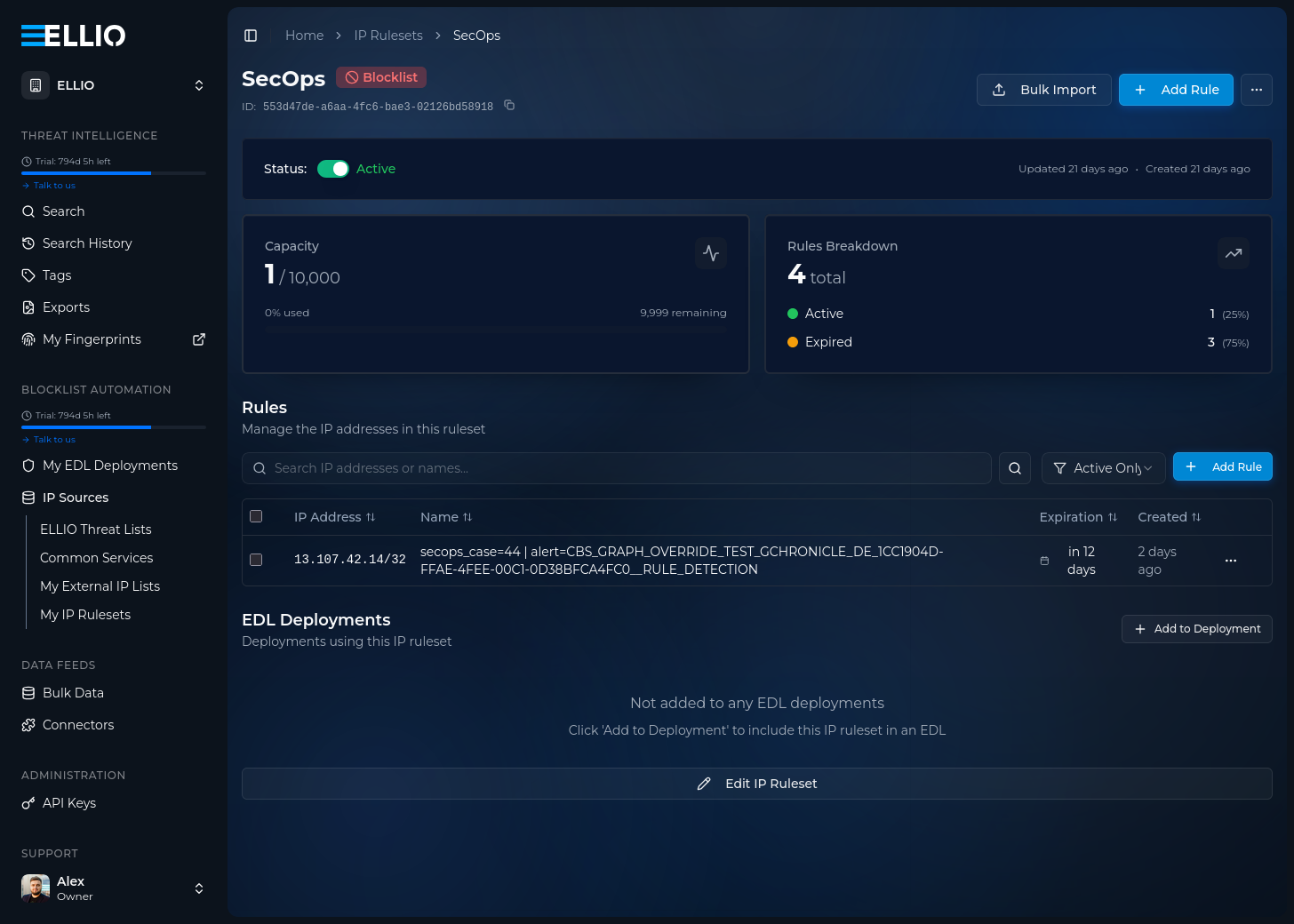
In ELLIO Platform, the pushed IP appears in the ruleset under IP Sources → My IP Rulesets, carrying the case context in its rule name and the configured expiry:
Choosing which IPs to block
Section titled “Choosing which IPs to block”The entity scope of the playbook step decides what gets pushed. Three options:
External IP addresses. Blocks only the entities SecOps classifies as external. Recommended when network zones are configured - the internal/external classification is derived from them, so keep your zones current (see managing networks in the Google SecOps documentation).
All IP addresses. Blocks every public IP entity on the alert (private, reserved, and SOAR-internal addresses are always skipped). No network zones needed, but alerts routinely carry your own public addresses - VPN gateways, mail servers, NAT egress - so you risk blocking your own infrastructure. Safe only if you maintain an allowlist IP Ruleset in ELLIO Platform containing your public IPs and exclude it from every blocklist you generate - excludes always win, so a pushed IP covered by that ruleset never reaches your enforcement points.
Only suspicious entities. Condition the step on the is_suspicious entity flag.
Enrich IP sets it for IPs ELLIO classified malicious or promiscuous,
but the flag is not ELLIO-specific - other integrations (Google Threat Intelligence,
Mandiant, VirusTotal) and analysts flagging entities manually set it too, so the step
blocks on any of those verdicts, not only ELLIO’s. A good option that combines with
either scope above.
Validates connectivity and credentials against the ELLIO API. No parameters.